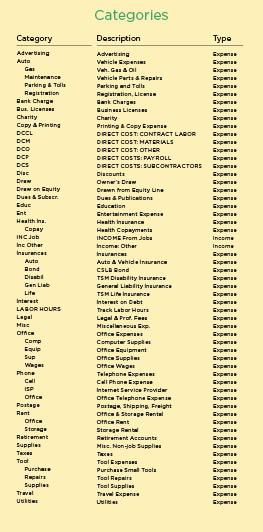
Take advantage of autofill. Once you’ve got your categories in place, you’ll find that you won’t be dealing with a lot of pull-down menus as you start to assign them. As you type, Quicken’s “autofill” function will insert the correct category. If you’re setting up categories for the first time, it’s a good idea to name unrelated categories so that they start with distinct letters. That way, after minimal typing, the program will recognize the word and quickly fill in the rest. In my own list, I have categories for income, insurance, and interest. Typing “in” calls up all three of these words, so then I have to select one or finish typing. It would be faster if I came up with distinct words for each of these categories: insurance, payment received, and credit charges, for example.
Fine-tuning with classes. Quicken’s next level of organization is called classes. For this purpose I have long used the 1995 MasterFormat divisions (for more information, visit www.masterformat.com). My classes are also the list by which I organize my estimates so that I can compare estimate to actual in a reasonably accurate manner.
My class list may contain more or less detail than you need, depending on the complexity of your projects or your interest in the detail of your records (Figure 2). After 20 years in business, I still haven’t fully memorized the classes, so I keep a laminated printout of the list near my computer for help when entering invoices.
To create a class, open Lists from the Quicken header and select Classes. You then simply enter the number in the Class column, add the Description, click Create, and the new item will show up in your class list from then on. Later, if you want to pull a report on, for example, all rough carpentry, you can request details on all classes beginning with 06.1—or whatever your class code may be.
Once you’ve entered the categories and classes that make sense for your business, you can start paying bills with Quicken, knowing that the details of your transactions will be captured for future analysis. (You could, of course, start paying bills first and add categories and classes as you go along, but in the long run it’s wiser to invest the time to enter the codes first. You can always add to them as the need arises.)